Fix Internal Storage Not Showing in Kali Linux
1. Open new section in termux
(1) First Exit your termux application. Then Open Termux App Again. Then Run the below command.
# To Update & install the nano file editor package.
pkg update && pkg install nano -y
(2) Now you need to open the install-nethunter-termux file via the nano package. For that, just copy and paste the below command.
nano install-nethunter-termux
(3) After that just use the PGDN button and scroll down. Then find this section which is shown in the image below.
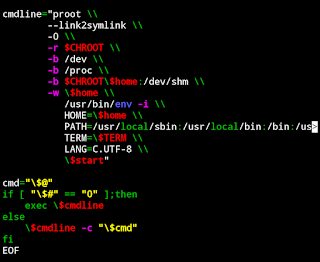
(4) Here you need to add one line to access your internal storage on your kali Linux on android.
-b /sdcard \\
Just paste this above command like the below image. If you did a mistake then you will not able to access your internal storage on your kali Linux on android.
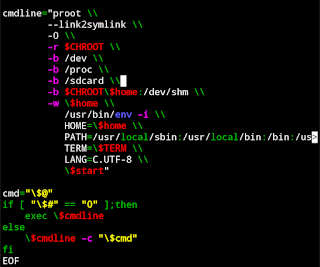
Then you need to save that file using these buttons.
CTRL +o Enter
CTRL +x
(5) After that you need to run the install-nethunter-termux file once again.
NOTE: Before running this file. Make sure you have the rootfs file present in your termux. If not then copy that file once again to your termux app.
OK in my case I have kalifs-arm64-full.tar.xz file in my termux app.
So let’s run the install-nethunter-termux file now.
bash install-nethunter-termux
After the run you just need to type :
n
Every question, it’s asked by you in the terminal.
(6) After you see this page. You are good to go.
(7) Now let’s access your internal storage in your kali Linux. Before let’s enter kali Linux mode first using the below command.
nh -r
To access your internal storage. Type :
cd /sdcard && ls
The above command shows your internal storage files in your terminal now.

(8) let’s access from the graphical interface (using vnc viewer App) Just connect your kali Linux remotely using vnc viewer app.
Then open the file manager app in the kali Linux apps section.
Now click on the File System option.
Now click on the sdcard folder. Boom now you have your internal storage files in your kali Linux on android.
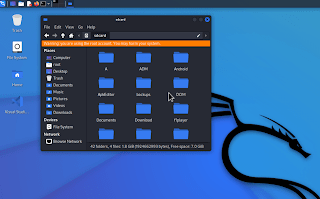
(9) Now you can copy-paste your file from Internal storage to Kali Linux or vice-versa.
In this way, you can fix Internal Storage Not Showing In Kali Linux (Kali Nethunter) On Android No Root.
 KOTHARIJI
Leave a comment